AnyBackup-AnyBackup 7.0 恢复 VMware 虚拟化平台 Linux 虚拟机开机时提示 Superblock last mount time is in the future
关键字
Superblock、Linux、恢复
适用产品
- AnyBackup CDM 7.0.x
- AnyBackup Enterprise 7.0.x
- AnyBackup Express 7.0.x
问题描述
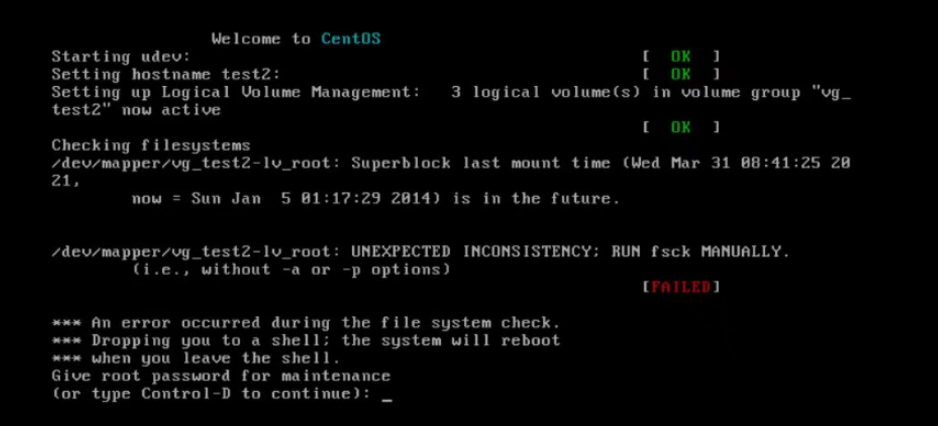
在 AnyBackup 管理控制台发起 VMware 虚拟机恢复,恢复虚拟机为 Linux 操作系统,恢复完成后开机,在引导阶段提示如下失败信息:
Checking filesystems
/dev/mapper/vgname: Superblock last mount time (<上次挂载时间 >,
now = <当前时间>) is in the future.
/dev/mapper/vgname: UNEXPECTED INCONSISTENCY:RUN fsck MANUALLY.
(i.e., without -a or -p options)
[FAILED]
*** An error occured during the file system check.
*** Dropping you to a shell; the system will reboot
*** when you leave the shell.
Give root password for maintenance
(or type Control-D to continue):
问题影响
恢复的虚拟机无法正常引导进入操作系统。
问题原因
恢复的虚拟机操作系统日期与时间错误,导致操作系统引导检查文件系统不通过并提示手动运行 fsck 命令检查文件系统。
解决方案
为了解决该问题,需要手动修正操作系统时间并重新引导,请按照以下步骤执行:
1. 输入正确的操作系统 root 密码后按回车。
2.设置操作系统时间为当前时间,执行如下命令:
date -s "yyyy-MM-dd hh:mm:ss"
3.重启操作系统,执行如下命令:
reboot
更多信息
Superblock 是 Linux 文件系统最基本的元数据,它定义了文件系统的类型、大小、状态,和其他元数据结构的信息。