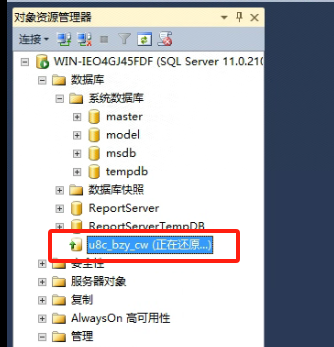
AnyBackup 完成对 SQL Server 的恢复任务,但数据库目前仍处于 "正在还原" 状态,暂时不可用,这通常意味着数据还在被同步或验证中,建议稍后再尝试访问数据库,以确保所有数据已正确恢复并完全可用,如有任何问题,请随时联系技术支持获取进一步帮助。
<article class="py-6 md:flex-1 md:pt-0 md:pr-4" shenjian-bridge-node-id="sjb-1788489298623-418259">
<header class="mb-6 break-words">
<p class="mb-4 md-down:mt-6 text-xl font-semibold" shenjian-bridge-node-id="sjb-1788489298622-999239" shenjian-fields="">
AnyBackup - SQL Server 恢复任务执行成功,恢复后的数据库处于“正在还原”状态,无法进行访问
</p>
</header>
<main class="relative">
<section class="content">
<p><strong style="font-size: 20px;">关键字</strong></p>
<p class="ql-indent-1">
<span style="color: rgb(0, 0, 0); font-size: 14px;">SQL Server、正在还原</span>
</p>
<p class="ql-indent-1">
<span style="color: rgb(0, 0, 0); font-size: 14px;"></span>
</p>
<p><strong style="font-size: 20px;">适用产品</strong></p>
<ul>
<li><span style="color: rgb(0, 0, 0); font-size: 14px;">AnyBackup Enterprise 7.0.11.0 及以上版本</span></li>
<li><span style="color: rgb(0, 0, 0); font-size: 14px;">AnyBackup CDM 7.0.11.0 及以上版本</span></li>
<li><span style="color: rgb(0, 0, 0); font-size: 14px;">AnyBackup Express 7.0.11.0 及以上版本</span></li>
</ul>
<p><br></p>
<p><strong style="font-size: 20px;">问题描述</strong></p>
<p class="ql-indent-1">
<span style="color: rgb(0, 0, 0); font-size: 14px;">SQL Server 恢复任务执行成功,但恢复后的数据库处于“正在还原”状态,无法访问数据库。</span>
</p>
<p class="ql-indent-2">
<img src="https://nuoboya.com/tu/5085eda0f9e40953ad63236018eda5db.jpg">
</p>
<p><br></p>
<p><strong style="font-size: 20px;">问题影响</strong></p>
<p class="ql-indent-1">
<span style="color: rgb(0, 0, 0); font-size: 14px;">无法访问恢复成功后的 SQL Server 数据库。</span>
</p>
<p><br></p>
<p><strong style="font-size: 20px;">问题原因</strong></p>
<p class="ql-indent-1">
<span style="color: rgb(0, 0, 0); font-size: 14px;">创建 SQL Server 恢复任务时,未启用“联机”选项导致。</span>
</p>
<p class="ql-indent-2">
<img src="https://nuoboya.com/tu/a264e5ed82ba65e3c2eb1f7750330db5.jpg">
</p>
<p><br></p>
<p><strong style="font-size: 20px;">解决方案</strong></p>
<p class="ql-indent-1">
<span style="color: rgb(0, 0, 0); font-size: 14px;">为了解决这个问题,需要手动切换恢复成功后 SQL Server 数据库的状态,请按照以下步骤操作:</span>
</p>
<p class="ql-indent-1">
<span style="color: rgb(0, 0, 0); font-size: 14px;">1、连接到 SQL Server 实例的主数据库</span>
</p>
<p class="ql-indent-1">
<span style="color: rgb(0, 0, 0); font-size: 14px;">2、执行 RESTORE DATABASE <db_name> WITH RECOVERY 命令,将处于“正在还原”状态的数据库进行恢复,并将其置为可用状态</span>
</p>
<p class="ql-indent-2">
<img